 DigitByte Software for Windows, Mac, iPhone, iPad, iPod – free download
How to convert video to MKV format directly
MKV is the symbol of the digital video format for Matroska Video. It is complemented by mka format, or Matroska Audio. Both feature as the fact that they are free format, it is not restricted by patents.
MKV is a container for the video data. Thus, MKV can contain data from several different types of encodings (or codecs) for video, its greatest usefulness is the synchronization of video data with audio, with the titles and subtitles etc. (please visit this page if you want to add subtitles to your video)
Because MKV is very close to DVD in the video quality, MKV is becoming more and more popular.
The following mkv converter software included in this page has been designed by us and is of the highest value and quality.
About Direct MKV Converter
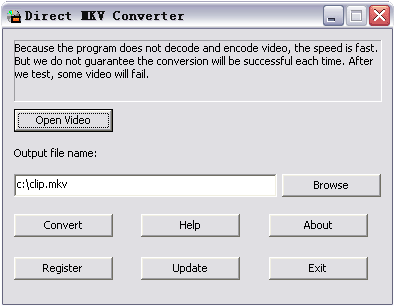
 Direct MKV Converter can convert video to mkv directly without compression. It supports input formats such as avi, wmv, asf, mpg, vcd or dat. If extra codecs are installed, the program may convert more video files like divx, xvid, ogm or dv to mkv. Because the program does not decode and encode video, the speed is extremely fast, but the conversion may not succeed each time. Tag: video to mkv converter
How to convert video to MKV file?
- Click the Open Video button, select a video file.
- Enter an output mkv file name if necessary.
- Click the Convert button to convert video to mkv file.
Note:
- Before you launch the program, recommend toinstall the MKV codec for mkv muxer.
- Because the program does not decode and encode video, the speed is fast.
 Buy Now – 100% secure! ($ 29.99)
 Download Direct MKV Converter
System Requirements:
- Windows 98/Me/NT/2000/XP/2003/VISTA/7/8
- DirectX 9.0 or higher
- Combined Community Codec Pack (CCCP) – MKV Codec recommended
Related Direct MKV Converter
- ASF TO MKV Converter
- SWF TO MKV Converter
- MOD TO MKV Converter
- M4V TO MKV Converter
- XVID TO MKV Converter
- WMV TO MKV Converter
- TS TO MKV Converter
- RMVB TO MKV Converter
- RM TO MKV Converter
- OGM TO MKV Converter
- MPEG TO MKV Converter
- FLV TO MKV Converter
- DV TO MKV Converter
- DVR-MS TO MKV Converter
- DVD TO MKV Converter
- DIVX TO MKV Converter
- DAT TO MKV Converter
- AVI TO MKV Converter
- 3GP TO MKV Converter
- MP4 TO MKV Converter
- How to convert MKV to AVI without loss subtitles
- MKV to AVI Converter software
- MKV to AVI with Subtitle
- Add subtitle to video
- Convert Video to AVI format
- VCD Converter