DigitByte Software for Windows, Mac, iPhone, iPad, iPod – free download
You can used Audio/video to Wav converter as DAT to Wav converter
mpeg to Wav | vcd to Wav | dat to Wav | avi to Wav | wmv to Wav | ac3 to Wav | wav recorder | audio extractor | audio recorder | audio merger | audio splitter | wav converter | Extract audio from FLV | Extract audio from mp4 | Extract audio from video
DAT Definition: DAT often is used to refer to a certain tape backup format.
1. To convert dat to Wav: if the dat file is encoded with mpeg1.0 format, you do not need to install any additional dat decoder. If the dat file is encoded with mpeg1.1 or 2.0 format, please install DVD players such as WinDVD Player or PowerDVDPlayer, which include the appropriate dat decoder. Please make sure the *.dat file is media file and Windows Media Player can play it because many other files also use this kind of extension.
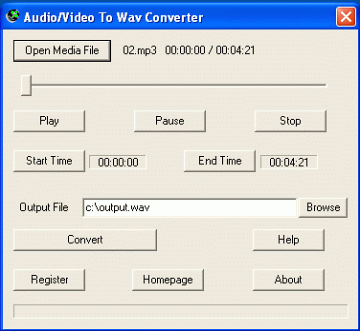
2 Launch Audio/Video to Wav Converter, click the Open Media File button, select a datfile.
3. If you want to convert the whole audio from the dat file to Wav / wave, set the Output File if needed, then click the Convert button.
If you want to convert some part of audio from the dat file, drag the slide bar directly, or click the Play button to preview the media file, set the Start Time and the End Time. At last, click the Convert button to start to convert dat to Wav.
VCR is Video cassette recorder. VCR plays VHS (video cassette recorder or video home system). To convert VCR or VHS to Wav, please install a TV tuner card on your computer and the software Open Video Capture. Make sure your cable connection is right. After record them to avi, use the converter to convert it to Wav.