DigitByte Software for Windows, Mac, iPhone, iPad, iPod – free download
MOVIE to Wav, FILM VIDEO to Wav
mpeg2 to Wav | rmvb to Wav | rmi to Wav | movie to Wav | qt to Wav | wav recorder | audio extractor | audio recorder | audio merger | audio splitter | wav converter | Extract audio from FLV | Extract audio from mp4 | Extract audio from video
1. To convert movie or film to Wav: please install the movie decoder or file codecs based on DirectShow on your Windows system.
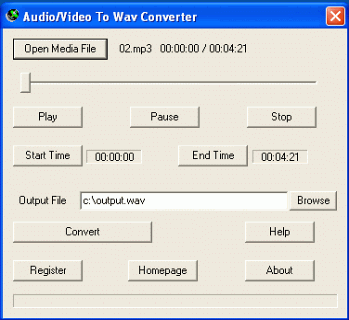
2. Run Audio/Video to Wav Converter, click the Open Media File button, select an movie file for movie to Wav or film to Wave.
3. To convert the whole movie file to Wav, set the Output File name if necessary, then click the Convert button.
To convert a part of the film file, drag the slide bar directly, or click the Play button to preview the MOVIE file, then set the Start Time and the End Time. Finally, click the Convert button to convert movie/film to Wav or wave.