 DigitByte Software for Windows, Mac, iPhone, iPad, iPod – free download
AU to Wav, AU Converter
divx to Wav | wma to Wav | rmi to Wav | au to Wav | ra to Wav | wav recorder | audio extractor | audio recorder | audio merger | audio splitter | wav converter
AU Definition: AU was created by Sun Microsystems, AU is sometimes referred to as “audio/basic” format, It is one of the most common audio formats used on the Web.
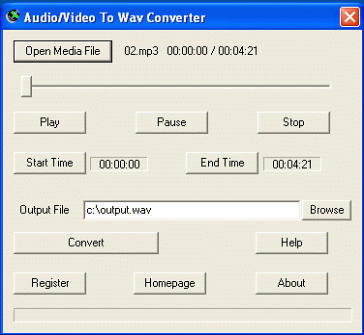
1. To convert au to Wav: run Audio/Video to Wav Converter, click the Open Media File button, select an au file for au to Wav (wave).
2. To convert the whole au file to Wav, set the Output File name if necessary, then click the Convert button.
To convert a part of the au file, drag the slide bar directly, or click the Play button to preview the AU file, then set the Start Time and the End Time. Finally, click the Convert button to convert au to Wav.
The converter can be used as AU converter, which can split au file, extract a part of wav (wave) from au format. The converter can be used as au splitter, au cutter, au trimmer. AU splitter can cut au file, trim au, slice au, divide au. It can also convert au to Wav, convert au to Wave.
WavPack stands for a completely open audio compressing format providing lossless, high-quality lossy coding algorithms, and a unique hybrid mode. The ratio depends on the source material, but generally is between 30% and 70%.
To convert wavpack to Wav or wave, please install the appropriate wavpack decoder/filter/codec (CoreWavPack)for the wavpack file. The file extention is wv or wvc.