 DigitByte Software for Windows, Mac, iPhone, iPad, iPod – free download
VOB to Wav | VOB Converter
Tags: | wav recorder | audio extractor | audio recorder | audio merger | audio splitter | wav converter | M4A to Wav | Extract audio from FLV | Extract audio from mp4 | Extract audio from video
VOB Definition: VOB stands for DVD Video Object. It is one of the core files found on DVD-Video discs and contains the actual movie data.
Audio/Video to Wav Converter is also a VOB converter which can extract audio from VOB files to Wav format.
1. To convert vob to Wav: please install the appropriate dvd player such as PowerDVD Player or WinDVD Player for the vob decoder. If the VOB file has been encrypted, the program does not convert it successfully.
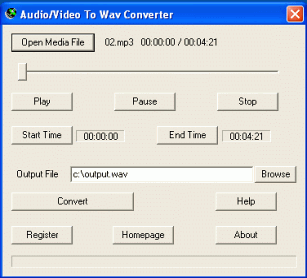
2. Run Audio/Video to Wav Converter, click the Open Media File button, select a vob file for vob to Wav (wave).
3. To convert the whole vob file to Wav, set the Output File name if necessary, then click the Convert button.
To convert a part of the vob file, drag the slide bar directly, or click the Play button to preview the VOB file, then set the Start Time and the End Time. Finally, click the Convert button to convert vob to Wav.
DVD stands for Digital Versatile Disc or Digital Video Disc. DVD is an optical disc storage media which can store data, movie, audio, images. DVD video always uses the vob files. If the DVD is protected or encrypted. Converting DVD to Wav or wave will fail.