 DigitByte Software for Windows, Mac, iPhone, iPad, iPod – free download
How to create audio effects?
Audio Effects are defined as the promotion of a realistic scene, the atmosphere of drama or message, and the increase in noise on the vocal cords or sound. To put it simply, Audio effects mean the effects created via sounds. The so-called Audio Effects, including the music and sound effects. There are three kinds of audio effects: digital audio, sound environment and general audio. Audio effects are special for movie, TV shows, live performance, animation, video games, music, or other media.
The following program is a simple but powerful audio effect software, with it, you can ouput a variety of audio effects for your media files.
About Audio Effect Software
Sound Effect Maker can create audio effects for your media files. It supports many kinds of sound effects, supports *.sgt;*.mid;*.rmi;*.wav directly. The software can change the following parameters of the sound effects:
- Chorus: wet/dry mix, depth, feedback, frequency, delay, waveform, phase.
- Compressor: gain, attack, release, threshold, ratio, predelay.
- Distortion: gain, edge, postEQ center freq, bandwidth, PreLowpass cutoff.
- Echo: wet/dry mix, feedback, left delay, right delay, pan delay
- Flange: wet/dry mix, depth, feedback, frequency, delay, waveform, phase.
- Gargle: rate. parametric equalizer: center freq, bandwidth, gain.
- Reverberation: in gain, reverb mix, reverb time, highfreq RT ratio.
 Download Audio Effect Software
Buy Now – $29.99

System requirements:
Note:
- To support more formats such as *.mp3, *.wma, *.ogg, etc, please convert the formats to wav file firstly by using our other program named Audio/Video To Wav Converter
How to create audio effects:
1. A default sound file is loaded when the application is run. You can load a different one by clicking Open File. Select an audio file(*.wav, *.midi, *.sgt, *.mid, *.rmi).
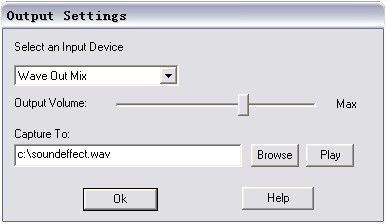
2. Click the Output Settings button to set the output settings.
Please select an input device with “Wave Out Mix”, which might appear as “Stereo Mix”, “Stereo Mixer”, “What U Hear”, “Output”, “Mixer”, “Wave”. When the program launches at the first time, it will select the item as possible as it can. If not, please select it manually.
If the sound of the output wave file is distorted, the most possible reason is that the volume of sound card is too louder, Please decrease the recorder volume of the program. If you can not hear the sound of the output wav file, please try to increase the recorder volume of the program, or increase the volume of “Volume control” or “Wave” of Windows.
In the Capture To field, the output file name (*.wav) can be changed.
3. At first, no effects are enabled. Click the Play button to hear the sound without effects. Click the Stop button to stop playing. Apply one or more effects by selecting checkboxes in the Enable column. Play the sound again.
To adjust parameters for an effect, select an option button in the Adjust column and change the values in the frame on the right side of the window. This can be done regardless of whether the sound is playing and regardless of whether the effect has been applied yet.