 DigitByte Software for Windows, Mac, iPhone, iPad, iPod – free download
Waterlogue – An application to convert or turn images to watercolor effect, more mainstream, and high-quality, very beautiful
Platform: iPhone, iPad, and iPod touch devices running iOS 7 and greater. Maximum rendering detail and export resolution depend on each device’s capability.
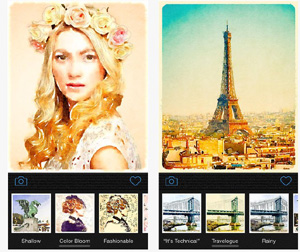
Waterlogue runs advanced image processing software for the highest possible quality watercolor rendering. It produces wonderful images on any device that runs iOS 7.
Photography, distilled
• See the world like an artist!
• Transform your photos into luminous watercolors.
• Use your watercolors to create an artist’s journal or notebook.
• Share you watercolors on Instagram, Twitter and other social media.
• Universal App for iPhone, iPad, and iPod touch.
• From the creator of Percolator and Popsicolor for iOS.
FEATURES:
• 12 pre-set styles to customize your watercolors by controlling wetness, pen outlines and color.
• Image export at high resolution
• Adjust borders, lightness, and detail
• Includes example images
12 kinds of styles :
natural
bold
luminous
it’s technical sense
travelogue
rainy
illustration
soaked blooming
shallow
color bloom
fashionable
blotted
Layer 4 resolution: 4 , 6, 8, 10
4 – Maximum color , blooming effect strongest ; 10 – patches minimum , the clearest outline of objects
How to use Waterlogue for converting or turning pictures into a watercolor effect
The default natural and 6 , choose the style and clarity , there will be a small map and pictures before doing comparison . Decided to use a style which , after the click , the system will start the simulation painting process , the photographs into watercolor : scratch , choose the color , wet paintbrush , color …
After you can select brightness adjustment : dark, darker, normal, lighter, light
You can decide whether to add the final painting frame .
When finished, click the love pictures and you can share them to instagram, twitter, tumblr , etc. There is also stored in the camera roll, copy, open in other applications , e-mail mailing .
Set key hidden in the shared mail post back function can set the picture format (JPEG or PNG), or image size (768×1024, 1536×2048, 2304×3072, 2448×3264)
Application entire interface is very simple , very easy to use operation