 DigitByte Software for Windows, Mac, iPhone, iPad, iPod – free download
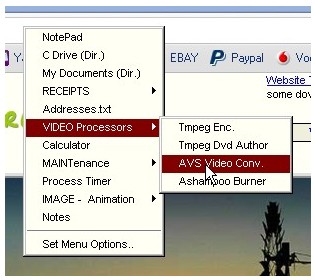
A tiny tool yet with poweful feature to create custom shortcut menu for your Windows
AnyMenu lets you create and customize a shortcut menu that allows you to easily access your most frequently used programs whenever you need them.
Easy to build and change, it is more convenient to use than desktop shortcuts or the Windows’ Start menu. Press mouse wheel or key to show menu. With one level submenus you can group different files/folders under one main menu item
This is a very useful feature, you can add almost any order to create your custom menu. The program also allows you to put your numeric keypad to enter the shortcut keys to control various common operations. If you are not familiar desktop shortcut, it is a useful tool for you.
It can be runned on all Windows O.S.
You can program the Numeric Keypad keys to activate system actions or programs or websites. You can easily disable this feature – it was added mainly for laptops used without a mouse. You can still use the numeric keypad normally.