 DigitByte Software for Windows, Mac, iPhone, iPad, iPod – free download
Sound Mixer Software
How to mix sound files?
The software below maybe the mixing software that you are looking for, simple use yet powerful functions.
About Sound Mixer
Audio Converter & Mixer is a sound editing, playing, mixing, and converting tool, it is very small in size yet its functionality is not weak. the sound mixer software support a variety of sound filesincluding WAV, MP3, WMA, AC3, OGG, MPA, MP2, AU, AIF, SND, etc, and it also can extract audio from video formats including VCD, MPEG, AVI, WMV, ASF, OGM, DIVX, DAT, SVCD etc.
 Buy Now – $29.99
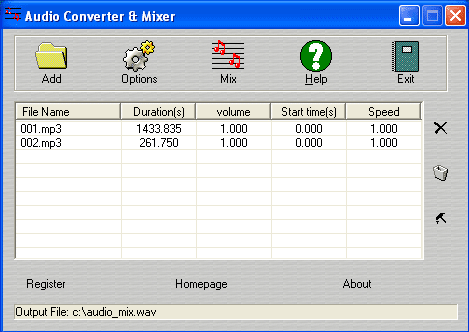
How to use:
- Download the sound mixer software and install it on your computer.
- Load the sound files that you want to mix.
- Select a folder to save your output file in Options box. if you wanto pre-listen your sound files, just doubleclick an item in the list, Window Media Player will play it automatically.
- Click the button
 at the right of the control panel, adjust the item sequence.
 - At last click the MIX button to mix your sound files.
Audio Settings Dialog:
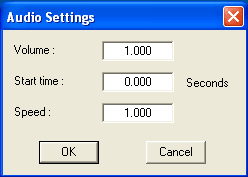
After select an item in the list, then click the button, or right -click an item directly, the dialog will popup. You can configure volume, start time and playback speed of each sound track.
Volume range: If the value is between 0 – 1.0, the output volume is lighter than original. If the value is greater than 1.0, the output volume is louder than original.
Start time: It the time of the output timeline.
Speed: It stands for playback speed. If the value is between 0 – 1.0, the output sound is slower than original. If the value greater than 1.0, the output sound is faster than original.
Output Options:
If you want know how to use the Output Options, you can read audio merger here