 DigitByte Software for Windows, Mac, iPhone, iPad, iPod – free download
How to convert video to 3gp online easy and fast?
If you have some video files, each file is not very large, you do not want to download anything, However, you want to convert video to 3gp format online, this was previously impossible task, but now, you can convert your video file to 3gp format with a online converter (online-convert.com), it is very convenient.
3GP is a streaming media video encoding formats based MPEG4, It is developed to be used mostly in mobile phones through the 3G network with high-speed transmission, so it is the most common video formats in mobile phone based GSM.
Here are the steps of online 3gp converter:
1. copy and paste online-convert.com into your browser address bar to access the site
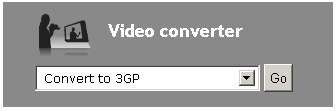
On the home page, in the “video converter” section, click the drop-down menu, select “Convert to 3GP “, click “Go” button
2. At this time, you came to the “Convert video to 3GP” page, click on “Choose File”, select a video file from your local hard disk, it is you want to convert file formats, or enter a video address, for example, a video address on YouTube, in the “Option settings” option, you can set various parameters, size of video:SQICF(128X96), QICF(176X144), (320X240), CIF(352X288), 16CIF(1408X1152), 4CIF(704X576), and video bitrate, audio quality, frame rate, Cut Video. in “Cut Video” column, you can set the video start time and end time, so that you can only convert your the favorite part of your video.

3. Well, after complete settings, click “Convert file” button to immediately display the file being processed, when the upload task is complete, another window will automatically perform the conversion task.

4. After conversion, a downloading dialog box pops up automatically (I use Google chrome browser), click ” download” to download the file to your local hard disk, if your browser does not pop-up downloading dialog box, you can click on the direct download link.

Done! the above steps are the online conversion process from video to 3gp format .
If you like this article, please Favorite it, thank you for your support
You may also be interested in the following:
Pavtube Video to 3GP Converter is an outstanding video to 3GP tool for cell phone users. With it, you can convert batches of video files to 3GP, 3G2, MP3 and AAC files, which can be played on cell phones. The high speed and the wonderful quality is spotless and beyond your expectation. The intuitive interface works as wizard. You will use it freely for the first time. Compared with other products, the 3GP Converter has the powerful functions, because it can supports various input formats including WMV, ASF, WMA, AVI, RMVB, RM, RA, MOV, QT, MP4, M4V, 3GP, 3G2, DAT, MPG, MPEG, MP3, VOB, DV, and the output formats contains 3GP, 3G2, MP3, AAC.
 Download Video To 3GP/3G2 Converter
Buy Now (PayPal) – 100% secure!