 DigitByte Software for Windows, Mac, iPhone, iPad, iPod – free download
If you want to convert your PDF file into a PNG image sometims, there are several method to do this job, here I will introduce you a best simplest way to convert pdf to png in three steps by using iSkysoft PDF Converter for Mac. with it, you can convert PDF to Word, Excel, PowerPoint, HTML, EPUB, images and plain text. Convert up to 200 PDF files at once. Convert a 100-page PDF within 1 minute, super fast. Supports password-protected PDF files.

Here is the steps:
1. Launch iSkysoft PDF Converter and Import your PDF Files
Launch the PDF to PNG Converter first. then just drag and drop PDF files in order to import PDF documents. you can also select some PDF documents, just hold on Shift key and click on the files you want.
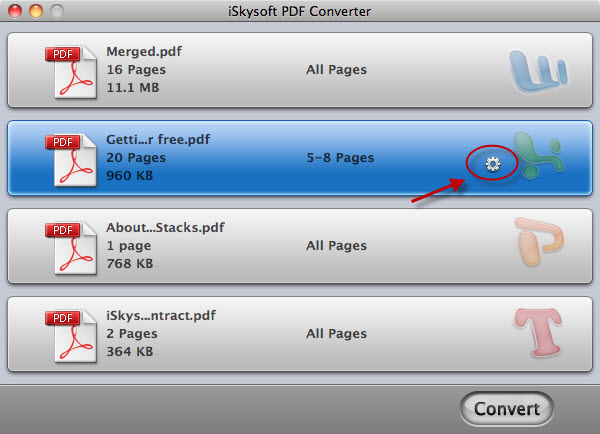
2. Choose PNG image format as an Output file
Once the png files have been imported, select Image format by clicking the Gear button on each item and then select PNG from the listing of image format. If all the PDF will be converted to the the PNG image format, then click the option “Apply to all“.
This PDF Converter supports converting encrypted PDF files. it is a easy work for you, just import these encrypted pdf files and convert PDF to PNG, automatically the restriction will be removed.
- For those Open Password protected PDF files, after you add them to the program, press the Lock icon on the left of item and input the right password to unlock them before conversion.

3. Start the PDF to PNG conversion with One Click
By default mode, all pages in your PDF file will be converted to PNG format in the mode of “each image per page”. You can change Page Range to convert the pages that you want. anymore, you can also extract all images included in the PDF file to PNG format.
- To extract images, go to Preferences > Images tab to make changes first.
After you have completed the additional options, click the “Convert” button for converting PDF to PNG format, it will only lasts few seconds.
Thanks a lot for reading this tutorial about how to convert PDF to PNG image format, hope this will help you a lot.
[download id=”70″ format=”3″]