 DigitByte Software for Windows, Mac, iPhone, iPad, iPod – free download
If you want to rip Blu-ray to iPhone and play your favorite movie on iPhone, it is necessary and convenient by using Tipard Blu-ray to iPhone 4G Converter which is easy to use. If you do not have knowledge of this conversion, No problem, you will learn in the following instructions.
Firstly, please download Tipard Blu-ray to iPhone 4G Converter, install and run. (note: you wil get a download manager from regnow, then download Blu-ray to iPhone 4G Converter by using this downloader)
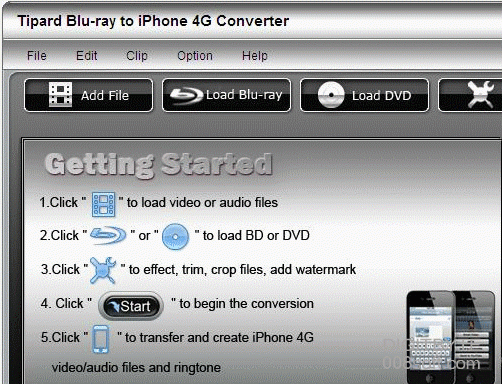
How can convert Blu-ray movies for iPhone 4G
1. Import Blu-ray movies in the app.
Click “Load Blu-ray” and select your Blu-ray movie or a Blu-ray folder to import Blu-ray files to the app.
2. Edit video (optional)
Click Edit button on the toolbar. On the next window you can edit your Blu-ray movies, including cut clips, crop image, adjust brightness, contrast, saturation, add watermarks.
3. Select output format
Select a profile from the profile list. A variety of video formats to choose from. You can also select portable devices. This means that the Blu-ray discs directly convert for relevant devices.
4. Destination folder
Click on “Browse” and select an output folder.
5. convert Blu-ray movie to iPhone
Click to start ripping Blu-ray to iPhone formats. Then can convert Blu-ray to iPhone-compatible formats and save it to your computer.
6. Ttransfer the converted DVD movies to your iPhone
- After the conversion is complete, click “Open Folder” button next to “Browse …”.
- Connect your iPhone to your computer. Find the converted files in the destination folder, run iTunes and copy them into iTunes. If you have “manually manage music and videos” option in iTunes, you can drag the converted iPhone videos on the iPhone icon to download them to your iPhone.
- Drag the files to the iPhone icon in iTunes and release the mouse button when a “Copy +” appears around the cursor The files are then automatically transferred to the iPhone.
Done! If you are interesting in this program, please download it from below URL, and get a free and wonderful trial!