 DigitByte Software for Windows, Mac, iPhone, iPad, iPod – free download
Apple has released iOS 7 full version for users to download , you can go to “Settings – General – Software Update ” to download ( jailbreak users to update with caution ) . iOS 7 is the largest version of the changes in the user interface and usage, this summary is for the new features and new operation of iOS 7.
First, one aim is to follow : iOS 7 is the familiar iOS, just change the appearance of a large , general habits and mode of operation most did not change, but some details of the changes .
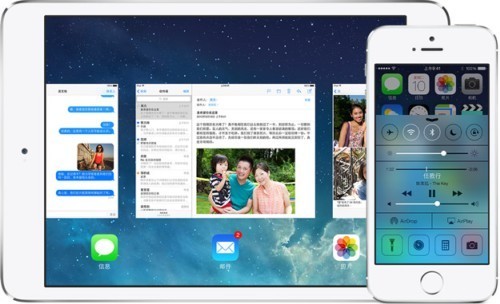
1 at any time from the bottom of the screen can be pulled out ” control center ” for fast switching Wi-Fi, Bluetooth, screen orientation lock , camera , flashlight , brightness , media player , calculator , timer, Bluetooth, do not disturb mode ( does not support custom ) . If you do not want to call the interface in the program or lock screen can – turn off the “Settings control center .” If you are playing a song , click on song name in the control center can go to the song being played app.
2 Double-click the home button interface completely changed into the card preview. If you think the road is too slow slide thumbnails app can toggle below the app icon will be a little faster . Push up the app thumbnails to close app.
4 For higher power requirements of users ( especially non- 5S user ) Best Off ” setting – Privacy – Location Services – System Services – frequented place ,” I am currently not aware of this feature for users in addition to low power consumption ( and consumption is other obvious effect ) away.
5 For the ” Settings – General – daemon refresh ” function , most of the major manufacturers at present has not been updated to support this feature , you can consider closing , but the role of this function can be made to support the following description : for example, Renren the app, after running in the background can be turned on automatically refresh new, do not go after every manual refresh ; such as micro-channel will not appear again , ” connecting … ” ” charge in the …” kind of thing , the new information will automatically receive news column . I believe this feature can be a lot easier after widespread support . The impact of electricity must be some , but not a lot of Apple’s argument based on the specific circumstances require testing.
6 In . ” Settings – Phone ( or SMS , FaceTime)” can be found in the “black list “, you can block all text messages to a phone number . In the call records and SMS records “ⓘ” ( circle i) which can also be ” block this call number ” to the blacklist .
7 In all systems built-in programs and adaptation iOS app 7 inside , you can pull from the right to the far left of the screen to return to the previous menu ( SMS, email, set up in extremely handy ) .
8 In the “Set -iTunes Store and App Store” which can open the ” automatically download the project – update ” in the Wi-Fi environment can automatically download the update ( my mother no longer have to worry about the little red circle App Store the upper right corner ) .
9 In a text message , pull slightly to the left of each message can be displayed transceiver specific time .
10. Safari multi -tabbed browsing interface, slide to the left tab to close tab .
11. AirDrop. This feature in the Control Center or the sharing interface opens, use can ( such as Evernote has been supported at close to other iOS 7 users to share content such as photos, contacts , memos , web bookmarks, and support for the app shared content ) and the like. Bluetooth share somewhat similar to the old-fashioned , but the speed and ease of use is higher than Bluetooth.
12 Press and hold the camera button on the camera application can be ” CS”, that is, how fast can shoot multi- shot fast , probably iPhone 5 is 3 per second , other equipment is less clear. 5S is another unique shooting function .
13 Compass application adds a level applications , slide to the left to bring up .
14. IOS 7 cancel the unlock tone, do not think that is a bug or what .
15 can be found in U.S. application users iTunes music broadcasts , such random function similar watercress fm music applications , but are played on the iTunes Store songs . Want to find Chinese radio station , then add the place just lose a Chinese singer ( as Jay ) , after adding in the above “ⓘ” ( circle i) there , ” according to the singer added stations ” to add all Chinese songs channel.
16 For 5S new features , please see Apple’s official website , a detailed description , just to say that iOS 7 common place.