 DigitByte Software for Windows, Mac, iPhone, iPad, iPod – free download
Here is the guide to teach you convert your favorite dv vdieo to DVD format with1Click DV to DVD, which is an easy-to-use DV to DVD transfer and DV to DVD burner which can convert DV to DVD, transfer full DV or a segment of DV to DVD disc. The DV to DVD converter also helps to backup DV to DVD folder or ISO file. It features in choosing the video quality and so on to make you watch DV film on DVD player so easily!
Free download 1Click DV to DVD
System requirements:
- Windows all
- One Video Capture Card compatible with Video for Windows and DirectShow
- One DVD-RW Drive at least
- Super VGA (800 x 600) dimension or more
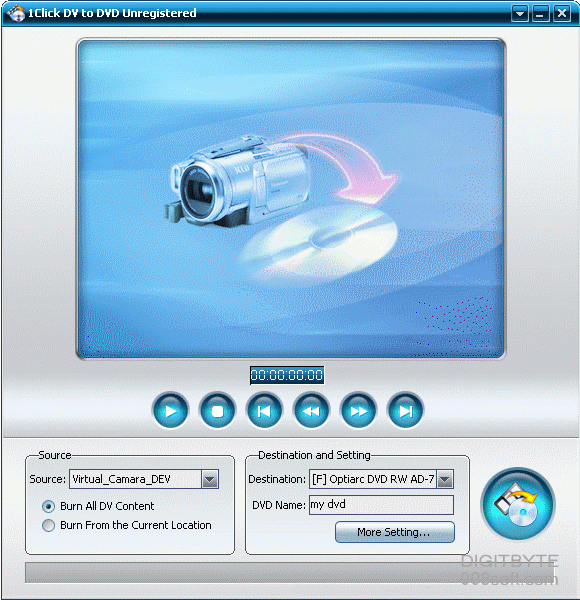
OK, now let’s teach you how to use it to convert your DV to DVD format or convert and copy a segment of the entire DV to DVD as you like?
Generally speaking, this can be done by setting the time of the segment on your DV player before you start converting and copying.
- step1. Connect the software with the DV player
Choosing the start time of the segment you took either on the DV player or on the Software interface with the >> (fast-forward) or << (rewind) button.
- step 2. Click the start button
the software DV to DVD Converter will capture the disc information automatically.
- step 3. Stop it at the time you need on your DV player.
The software will stop capturing and begin converting and burning the segment to a DVD disc directly.
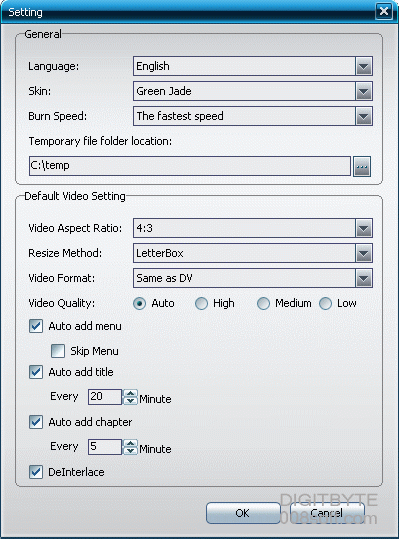
For output DVD format settings, the software is also very rich options, the following is a screenshot:
Now, just download it to begin convert your DV to DVD now: