 DigitByte Software for Windows, Mac, iPhone, iPad, iPod – free download
This is a simple and fresh UI free recording software. If you need to record something, this software is recommended for your collection
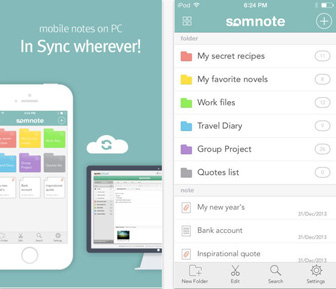
“SomNote – Memo / Diary / Sketch” is a lightweight cross-platform cloud notebook applications, 6 colors optional folder, Text and images can be recorded, Support the search function, E-mail to share documents, Can cloud sync documents after registration, 100M storage space, there are software locks to prevent privacy being watched.
Features:
– Sketchbook: scribble, attach and share
– The Look: A gorgeous user interface offering eye candy for your everyday note taking
– Work effective: Organize your thoughts to customized folders and with supported diverse view mode
– Can’t just have words in your book: Attach any files, documents, photos to your notes up to 1GB
– Share with friends: save your notes and send via facebook, twitter, and email
– Cost?: So demanding with all the features you need for a note and its FREE
– Manage: create and edit your notes and update them mutually as your thoughts are updated
– Safety is everything: Pin protection applicable to lock your SomNote app
– Go green! Recycle: Find, restore your lost or old notes from the recycle bin
– History tab: work off your previous notes saved by time, date
– Timing: Keyword search to quickly find notes from your list, notes completely searchable
– Print tab: You can print your note directly in SomNote